
Blog
Talking, Not Typing: How Voice AI Reshapes Your Workflow
What Is Voice AI, and Why Is It a Turning Point?
Voice AI is software that turns spoken language into action or text using speech recognition and natural language processing (NLP), letting you talk to a computer instead of typing or tapping. That definition sounds simple, but the shift behind it is large. For roughly 40-50 years the graphical user interface—the desktop, the mouse, the drag-a-file-to-trash metaphor Apple popularized in the 1980s—has been the dominant way humans work with machines, barely changing across four decades.
Voice AI represents the next paradigm. AsyncSquad Labs frames human-computer interaction as four eras: command line (1960s-1980s), graphical interface (1980s-2000s), touch (2007-2015), and voice (2011-present), the last kicked off by products like Apple Siri, Amazon Alexa, and Google Assistant. What makes 2026 different from 2011 is that large language models finally make spoken interaction accurate and conversational rather than rigid and command-based.
The money is following the shift. The Business Research Company projects the voice user interface market will reach roughly $69 billion by 2029, growing at a 22.6% CAGR. In a 2023 Deepgram and Opus Research survey of 400 companies, 82% already used some voice solution—67% to improve employee productivity and 45% to increase operational efficiency. Voice AI is a turning point because it changes the default input method for a huge range of tasks, and businesses are already spending on it. If you want the precise terminology, FluidVox keeps a voice typing glossary covering more than 60 speech-to-text terms.
How Voice AI Changes the Way We Interact With Computers

Voice AI changes interaction by replacing discrete taps and keystrokes with continuous natural speech—and speaking is far faster. People speak at around 150 words per minute versus roughly 40 words per minute typing, about a 3-4x speed advantage. Instead of clicking through menus and pages, you say what you want and the system parses intent.
The first big change is hands-free input. You can dictate a message while walking, cooking, or driving, and you can operate small or screen-less devices—watches, earbuds, glasses—where swipe keyboards never scaled well. Josh.ai founder Alex Capecelatro argued back in 2015 that voice simplifies the interface itself by removing the per-task buttons and pages, letting you complete many actions with zero taps.
The second change is that dictation now flows straight into whatever app you are using. Modern tools activate on a hotkey, transcribe your speech, and insert the text into the active window—no copy-paste. FluidVox, for example, lives in the macOS or Windows menu bar; you hold a hotkey to dictate, release to stop, and the cleaned-up text lands directly in your email, Slack, Google Docs, or Notion. That difference between reading text aloud and controlling an app matters enough that FluidVox published a full guide on voice typing versus dictation.
The third change is multimodal input. Vision-language models like GPT-4o and Gemini 1.5 process audio, video, and text together, so future interfaces blend speech, gesture, gaze, and typing rather than forcing a single mode. Shieldbase describes this as a move from input-and-response to understanding-and-collaboration. You still type when precision matters; you speak when speed matters.
The Technology Behind the Shift: Speech Recognition and NLP
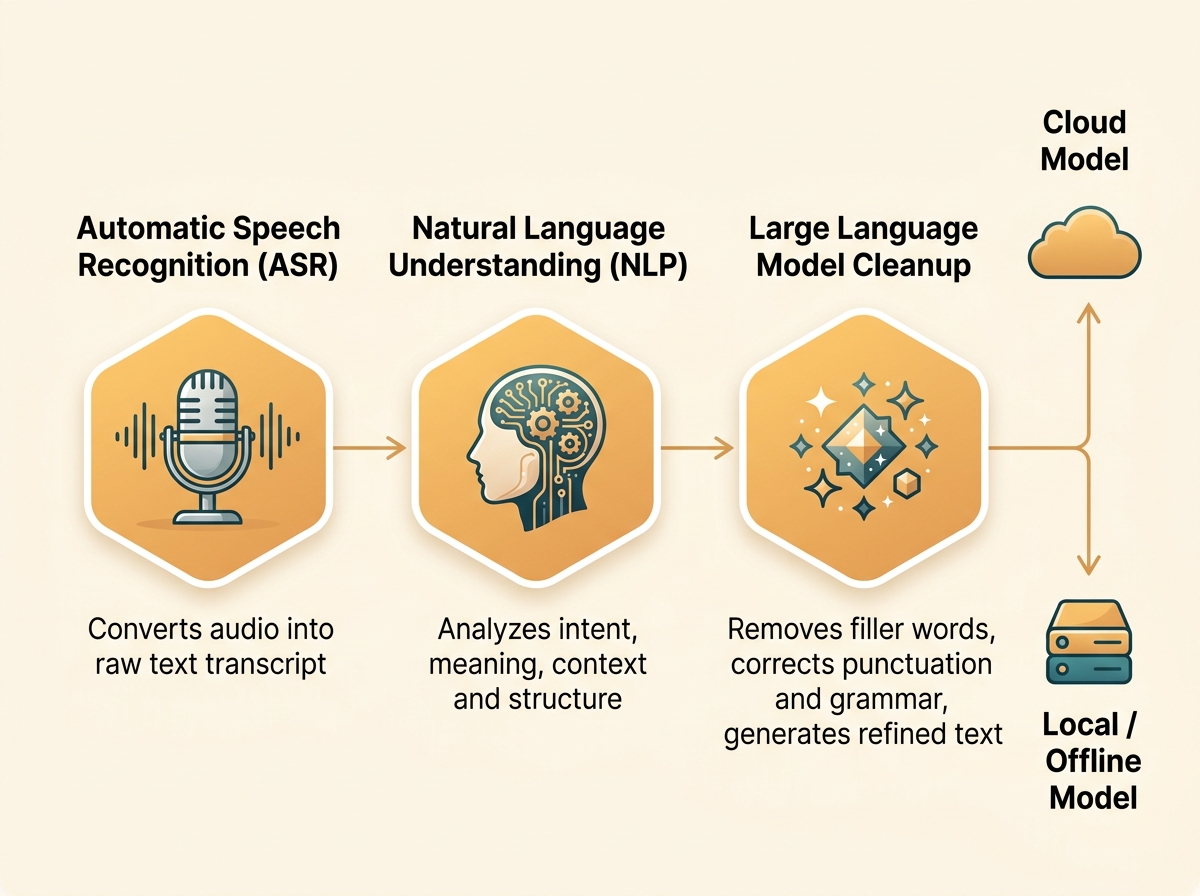
The shift runs on three layers: automatic speech recognition (ASR) that converts sound to text, natural language understanding that figures out meaning, and—newer—large language models that clean and reshape the output. Across nearly every source surveyed, NLP is named the core engine enabling voice interaction, with eight of thirteen sources tying the shift directly to natural language progress.
Speech-to-text is the front door. OpenAI's Whisper made robust real-time recognition possible across accents and messy phrasing, and it feeds many current tools. What large language models add is the polish step: they strip filler words like "uh" and "um," fix spelling, insert punctuation, and clean grammar as you speak. FluidVox applies exactly this pipeline—LLM-driven cleanup in real time, plus custom dictionaries and six transcription styles. If you want the plain-language mechanics, FluidVox explains what voice typing is and how it works.
There is a real architectural choice between cloud and local models. Cloud transcription taps large models on remote servers; local (offline) transcription runs on your own machine, which helps with privacy and works without a connection. FluidVox offers both, and its team argues local models can beat subscription cloud apps for many everyday tasks.
Multilingual coverage is one of the clearest recent gains. FluidVox supports 99 languages, and better acoustic models have narrowed—though not eliminated—the accuracy gap for accents and non-native speakers. That gap is why FluidVox maintains a dedicated guide on dictation for ESL speakers and a breakdown of what word error rate actually measures.
Where Voice AI Wins—and Where Typing Still Beats It
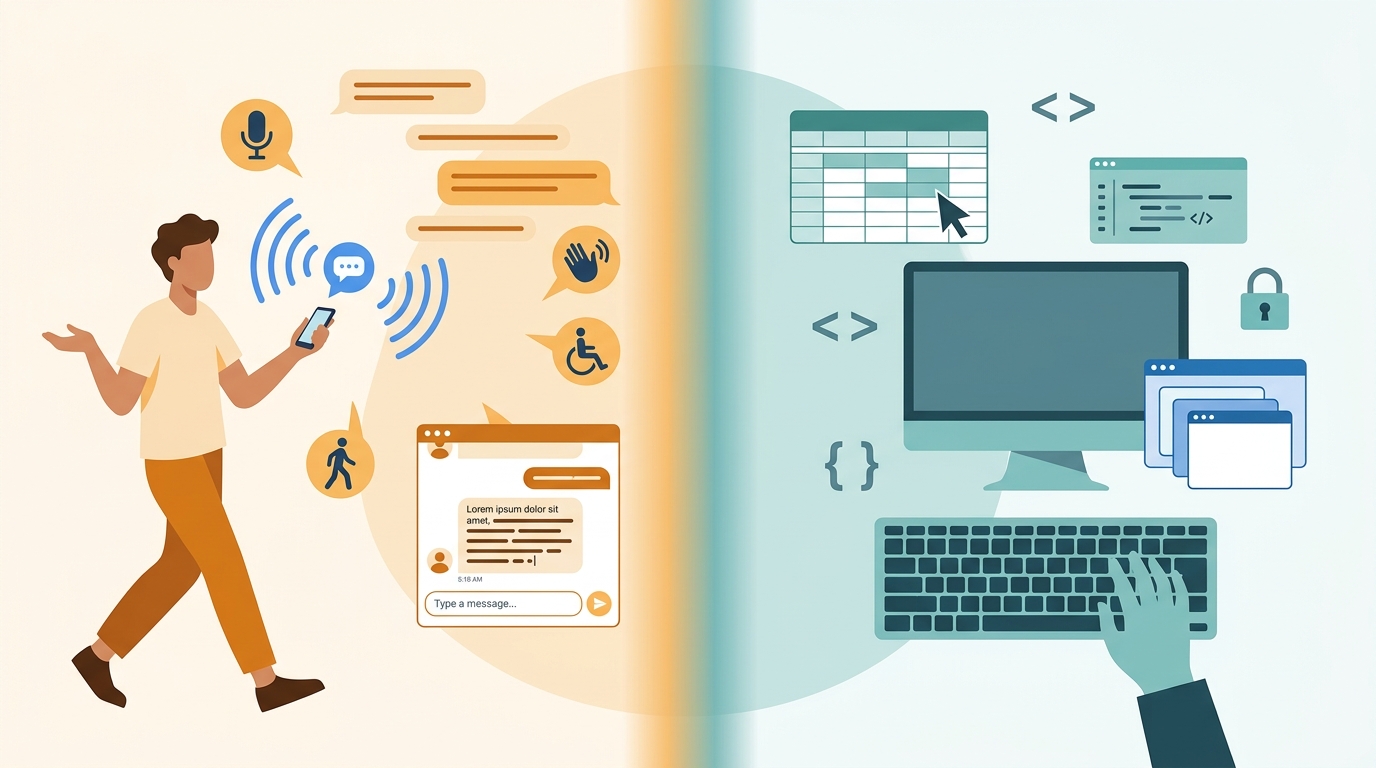
Voice AI wins for drafting, dictation, and hands-free or mobile contexts; typing and the GUI still win for precise editing, code, noisy rooms, and privacy-sensitive work. Nearly every source agrees on the same conclusion: voice augments the graphical interface rather than replacing it, and human judgment stays in the loop. The table below sums up the trade-offs.
| Dimension | Voice AI wins when… | Typing / GUI wins when… |
|---|---|---|
| Speed | Drafting long text—about 150 wpm speaking vs 40 wpm typing (~3-4x faster) | Short, exact edits where re-dictating a whole line is slower |
| Precision | First drafts, brainstorming, capturing ideas quickly | Code, formulas, tables, and character-exact edits |
| Context / environment | Hands busy, mobile, small or screen-less devices, accessibility needs | Noisy open offices where recognition accuracy drops |
| Privacy | Local (offline) models keep audio on-device | Shared or public spaces where speaking aloud exposes content |
| Cognitive fit | Talking through an idea in natural language | Scanning and manipulating dense visual layouts |
The balance is genuinely contested. Fresh Consulting suggested in 2020 that tactile interfaces may eventually be superseded by voice, while Aquent and AsyncSquad Labs argue for a hybrid future where voice becomes primary but never sole. Accuracy still varies with accent, gender, age, and background noise. And as MGA and Capitol Technology University both stress, AI cannot replicate the nuance of human judgment—the technology drafts, but a person still decides. For most knowledge workers the practical answer is: dictate the draft, then edit with the keyboard. FluidVox's own voice typing for writers guide leans on exactly that split.
Voice AI in Everyday Workflows Right Now
Voice AI is already embedded in daily knowledge work, not just smart speakers. Here are the current, concrete uses:
- Dictating into email, chat, and docs. Tools that type into the active app let you speak messages in Slack, Discord, or Telegram and full drafts in Google Docs or Notion. FluidVox works this way across Slack and ChatGPT, inserting cleaned text with no copy-paste.
- Note-taking and capture. Speaking into Apple Notes or a project tool captures ideas faster than typing. See FluidVox's guides for Apple Notes dictation and Notion dictation.
- Accessibility. Voice input democratizes technology for people with visual, motor, or learning differences, the elderly, and limited-literacy users—a benefit FluidVox documents in its accessibility guide.
- Clinical and field work. Voice AI reportedly saves physicians 2-3 hours a day on documentation, and hands-free workflows keep workers' eyes and hands on the task in manufacturing and aviation.
- Voice generation and agents. ElevenLabs produces AI voice generation, voice cloning, dubbing, and conversational voice agents for creators, enterprises, and developers—the output side of the same technology stack.
- Cross-platform dictation. FluidVox runs on macOS, Windows, and iPhone, activating on a hotkey so text lands directly where you are working. Its full use-case library covers app-by-app setups.
What the Voice-First Future Looks Like by 2029
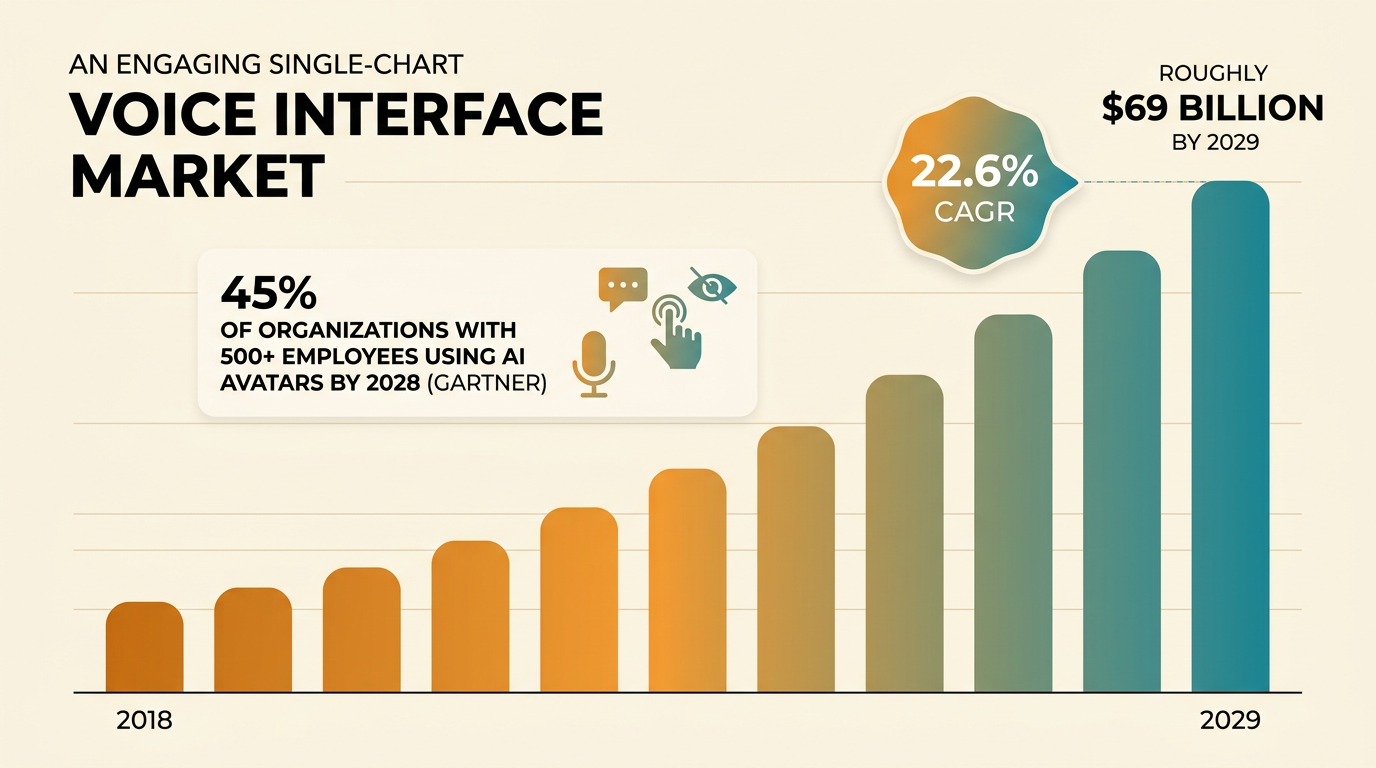
The voice-first future is multimodal and augmentative, not a keyboard funeral. The market signal is strong: the voice user interface sector is projected to reach roughly $69 billion by 2029 at a 22.6% CAGR, and Gartner predicts 45% of organizations with more than 500 employees will use employee AI avatars by 2028.
Expect convergence, not replacement. Aquent describes an emerging hybrid that pairs the graphical interface with an AI-powered voice layer of speech-to-text, understanding, and text-to-speech—voice becoming the primary input for many tasks while screens and touch stay for precision. Vision-language models keep folding audio, gesture, and gaze into one interaction surface.
Two things stay unresolved. Accuracy still bends with accents, languages, and noise, and privacy questions around always-on microphones and voice cloning remain live adoption barriers. Sources also disagree sharply on timing: Fresh Consulting once placed transformative AI "a few decades away," while Aquent cites Sam Altman predicting the most empathetic conversation could be with AI within "a couple of years." The safe read for a knowledge worker: adopt voice AI now for drafting and hands-free work, keep the keyboard for the exact edits, and treat the shift as an addition to your toolkit rather than a swap.
Key takeaways
- Voice AI marks a paradigm shift from a 40-50 year GUI-dominant era toward natural spoken, multimodal interfaces.
- Speaking runs roughly 3-4x faster than typing—about 150 words per minute versus 40.
- The voice-interface market is projected to reach ~$69 billion by 2029 at a 22.6% CAGR (The Business Research Company).
- Voice AI augments GUIs and human judgment—it does not replace them.
- Advances in speech recognition, NLP, and large language models are what made hands-free interaction viable.
Frequently asked questions
Is voice AI faster than typing?
Yes, for drafting. People speak at roughly 150 words per minute versus about 40 words per minute typing, roughly a 3-4x speed advantage per AsyncSquad Labs. Voice loses that edge on short, exact edits, where re-dictating a whole line can be slower than a quick keystroke, so most workers dictate the draft and edit with the keyboard.
Will voice AI replace keyboards and touchscreens?
Almost certainly not. Nearly every source—Aquent, AsyncSquad Labs, Josh.ai—argues for a hybrid future where voice becomes a primary input for many tasks but coexists with graphical interfaces. Typing still wins for code, precise editing, noisy environments, and privacy-sensitive work. Expect voice to augment your workflow, not erase the keyboard.
What is the difference between voice AI and a voice assistant like Siri?
A voice assistant like Siri or Alexa is one product built on voice AI. Voice AI is the broader field—speech recognition, NLP, and language models—that also powers dictation tools like FluidVox, voice generators like ElevenLabs, and enterprise voice agents. Assistants answer commands; dictation tools convert continuous speech into text inside your apps.
How accurate is voice AI in noisy environments?
Accuracy drops in noisy settings and also varies with accent, age, and non-native speech, which sources flag as a real adoption barrier. Microphone-array hardware and models like OpenAI's Whisper have improved robustness, but a quiet room still yields the best results. Local and cloud models handle noise differently, so testing your own setup matters.