
Industry Analysis
Why the New Voice Transcription Model Wars Actually Matter
On this page
- Accuracy has commoditized — Cohere’s 5.42 WER proves it
- Real-time and reasoning widen the gap between model and product
- Local vs cloud stopped being a trade-off
- Raw transcripts are not what people actually want
- The interface layer is where switching costs live
- The objections
Accuracy has commoditized — Cohere’s 5.42 WER proves it
The top open-source voice transcription models are now clustered within a fraction of a word error rate point of each other, and for everyday dictation that gap is invisible. When Cohere launched Transcribe in March 2026, it posted a 5.42 average WER on the Hugging Face Open ASR leaderboard — narrowly beating Zoom Scribe v1, IBM Granite 4.0 1B, ElevenLabs Scribe v2, and Qwen3-ASR-1.7B Speech. Whisper variants from OpenAI and NVIDIA’s Parakeet sit in the same neighborhood. We’re now arguing about decimals.
Think about what a 5.42 WER actually means. On a 100-word email, that’s roughly five tokens the model might miscatch — and most of those are filler like “um,” “uh,” or a homophone a downstream LLM can fix in milliseconds. The difference between rank one and rank five on that leaderboard is smaller than the difference between you talking with coffee in your mouth or not.
This is the classic commodity curve. Image recognition went through it around 2017, machine translation around 2021, and ASR has now joined them. Cohere being willing to open-source a 2-billion-parameter model that beats commercial competitors isn’t a flex — it’s an admission that the moat is gone. If you want a deeper breakdown of what these numbers actually mean for users, we wrote about what WER means for voice typing accuracy separately. The short version: if you’re choosing a dictation tool in 2026 based on WER alone, you’re optimizing the wrong variable.
Real-time and reasoning widen the gap between model and product
The frontier has moved from accuracy to latency and reasoning, and that shift makes the product wrapper matter more, not less. On May 7, 2026, OpenAI released three new realtime voice models: GPT-Realtime-2, which brings GPT-5-class reasoning to spoken conversation; GPT-Realtime-Translate, which handles 70+ input languages translating into 13 output languages live; and GPT-Realtime-Whisper, a streaming speech-to-text model that transcribes as you talk.
These are genuinely new capabilities. Streaming transcription means you see words appear before you finish the sentence. Live translation means you can dictate in Portuguese and watch English fill a Slack message. Reasoning-aware voice means the model knows when you’ve corrected yourself mid-sentence and adjusts.
But here’s the thing: those capabilities sit behind a developer API. They do nothing for the knowledge worker writing a Slack message unless an application reaches up to that API, manages the audio stream, handles the interruption logic, decides when you’re done speaking, and types the result into the active window. OpenAI ships the engine. Someone else has to ship the car.
This is the exact wedge between a model and a product. A faster transcription model that streams beautifully into a terminal helps almost no one. A dictation app that uses that streaming output to make typed text appear inside Gmail, WhatsApp, or ChatGPT before you finish the sentence is the actual product. The model is necessary. It is nowhere close to sufficient.
Local vs cloud stopped being a trade-off
The old assumption — that running transcription locally meant accepting worse accuracy — no longer holds. Cohere’s Transcribe runs on consumer-grade GPUs at 2 billion parameters. Parakeet runs natively on Apple Silicon. Whisper has spawned distilled variants like distil-whisper that run on a laptop CPU. The quality floor for local models in 2026 is roughly where the cloud ceiling was in 2024.
That changes the decision. Local versus cloud is now a preference question, not a quality question. You pick local for privacy (medical notes, legal drafts, anything regulated). You pick local for offline use on a plane or in spotty coverage. You pick cloud when you want the absolute latest model and don’t mind a network round trip. Neither answer is wrong, and the WER difference at the user level is somewhere between negligible and zero.
The product implication is that users shouldn’t have to commit. FluidVox, for instance, lets you toggle between cloud and local models depending on context — a casual chat in Telegram might use cloud for speed, while a sensitive document might run entirely on-device. That kind of switching only makes sense once local has caught up, which it now has. If you’ve been using something like MacWhisper or Aiko and feeling the local-only ceiling, the constraint isn’t the model anymore — it’s how the app surfaces the choice.
Raw transcripts are not what people actually want
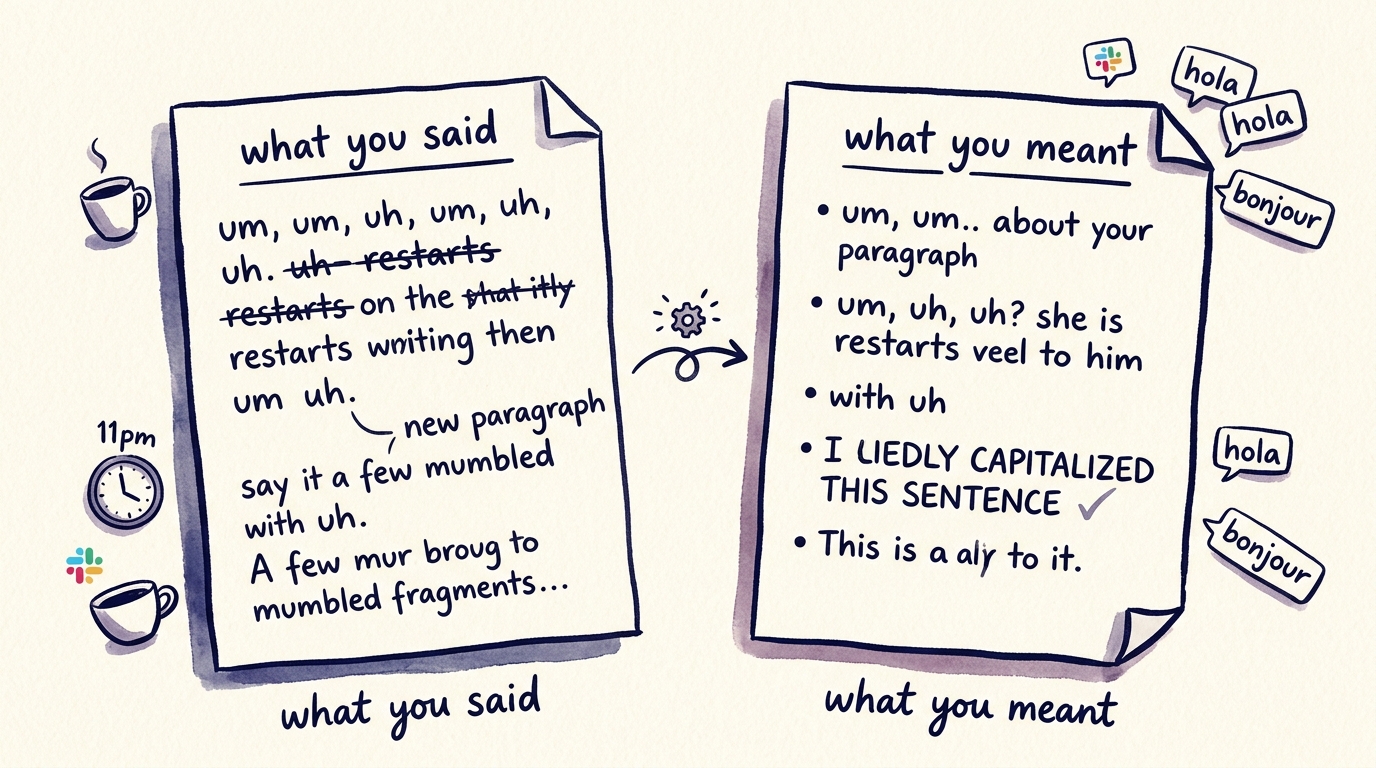
Here’s the dirty secret nobody benchmarks: literal speech-to-text output is unusable. People say “um.” They restart sentences. They mumble punctuation. They mix languages mid-thought. They say “new paragraph” out loud or, worse, expect the system to figure it out. A model that achieves a perfect WER on a clean LibriSpeech audiobook will still produce embarrassing output when a real human dictates a real Slack message at 11pm.
What people actually want is the cleaned, formatted, context-aware version of what they meant — not the literal transcript of what they said. That requires a second pass: an LLM that removes filler, fixes grammar, adds punctuation, and reformats based on the target. A code comment shouldn’t look like a Telegram message. A board email shouldn’t look like a casual Slack thread.
This is the actual product-market problem. FluidVox lives in the macOS or Windows menu bar, triggers on a hotkey, runs the transcription, runs an LLM cleanup pass, and types the result directly into whatever app is in front. No copy-paste. No staging window. No “open transcription app, dictate, copy, paste, edit.” It supports 99 languages with custom dictionaries, which matters because real bilingual users don’t switch language settings — they just talk. For people who dictate all day, we wrote up voice typing use cases across every major app showing what this looks like in practice across Gmail, Slack, and Apple Notes.
The benchmark leaderboard measures accuracy. It does not measure whether the output is something you’d actually send.
The interface layer is where switching costs live
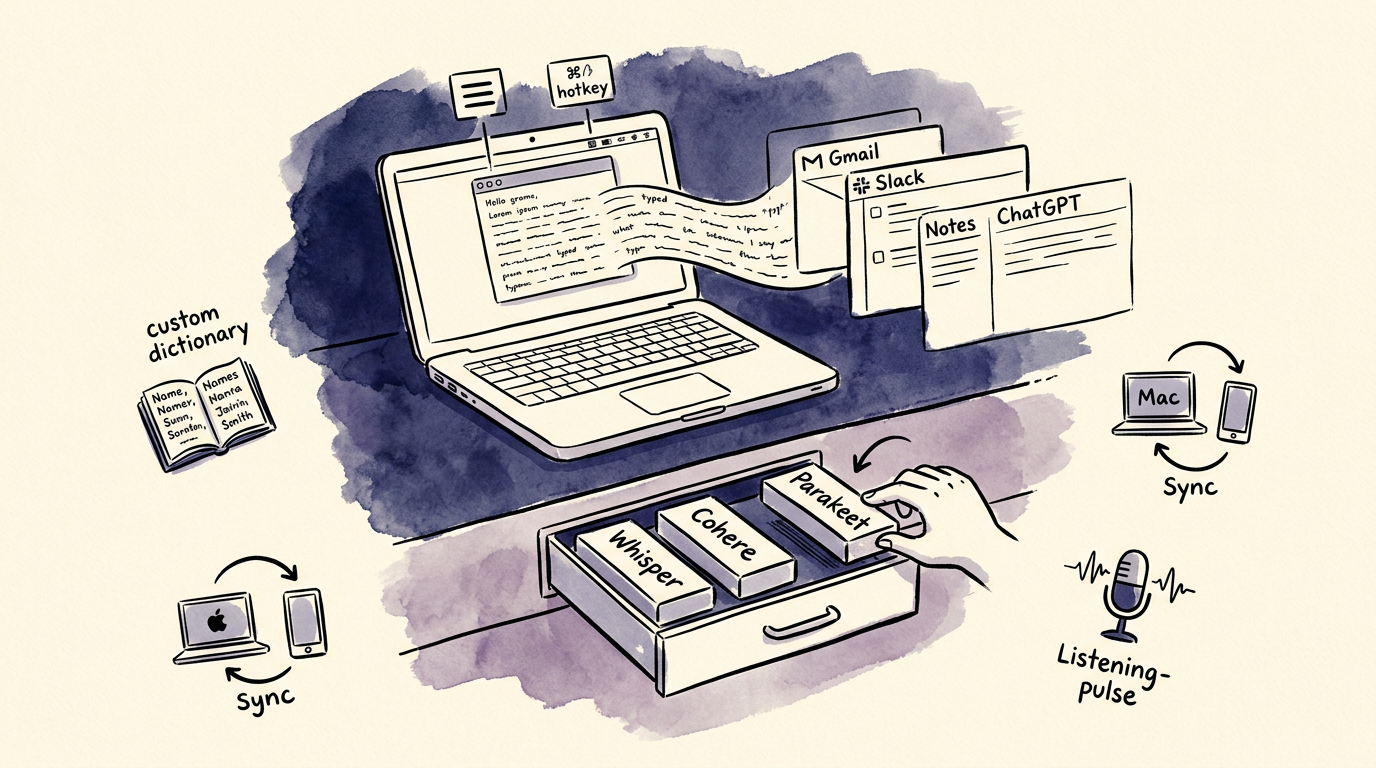
The model you use in 2026 will not be the model you use in 2027. That’s a feature of the current pace, not a bug. Cohere shipped Transcribe in March. OpenAI shipped three new models in May. Someone — probably Google, possibly Meta, definitely a startup nobody’s heard of — will ship something better by next quarter. Betting your workflow on a specific model is betting on the wrong horse.
What persists is the interface. The hotkey muscle memory. The custom dictionary you’ve built up with your colleagues’ names, your product SKUs, your jargon. The cross-device sync between your Mac, your Windows machine, and your phone. The way the menu bar icon tells you it’s listening. The way text appears in the active window without you ever switching focus. These are the things you’d actually miss if you swapped tools.
This is also where the Windows built-in Win+H voice typing falls short — the model is fine, but the interface is locked, the dictionary doesn’t travel, and you can’t swap the model underneath when something better ships. Same story with Apple’s built-in dictation: serviceable model, frozen product surface.
The right way to pick a dictation tool in 2026 is to pick an interface that can ride the model wave. Whatever transcription engine wins next quarter — Cohere’s, OpenAI’s, the next Whisper — you want your hotkey, your dictionary, and your workflow to stay constant while the model under the hood gets quietly swapped for something better. That’s the whole bet.
The objections
“Specialized models still beat general ones for medical, legal, or technical vocabulary.” True at the edges. A radiologist dictating ICD-10 codes or a litigator citing case law will see real WER differences between a generalist model and a domain-tuned one. But most knowledge workers are dictating emails, Slack messages, meeting notes, and ChatGPT prompts — not medical reports. And even when domain accuracy matters, the working solution in 2026 is a custom dictionary plus an LLM post-processing pass layered on top of a commodity model. That layering happens in the product, not the model. The edge case strengthens the argument rather than weakening it.
“Open-source models like Cohere Transcribe mean power users can just self-host and skip the product layer.” Sure, if you’re a developer who enjoys spending a Saturday with Docker and CUDA drivers. Self-hosting a 2-billion-parameter model on a consumer GPU is a fine weekend project. It is not a workflow for someone who needs to dictate into Gmail, Slack, Notion, and iMessage forty times a day. Running the model is the easy part. The hard parts are OS-level hotkey handling, accessibility permissions on macOS, focus detection across apps, audio device management when you plug in AirPods mid-sentence, and graceful fallback when the GPU is busy rendering a video. The model is a component. The product is the system that makes the component invisible.
“Latency is the real differentiator and bigger models will always lose there.” Partially fair, and it’s why GPT-Realtime-Whisper exists. But latency is a moving target that smaller distilled models keep narrowing. More importantly, perceived latency in dictation is dominated by hotkey activation, audio capture startup, and app injection — not by inference time. Shave 80ms off the model and the user can’t tell. Shave 80ms off the round trip from keypress to first visible character and they absolutely can.
So what should you actually watch?
The headline race — Cohere vs OpenAI vs Whisper vs Parakeet — is the wrong scoreboard. WER convergence means the model layer is settling into commodity status, and the next twelve months of voice dictation will be defined by whoever builds the most invisible, fastest, most language-flexible interface around these now-interchangeable engines.
If you’re picking a dictation tool, stop asking which model it uses. Ask whether the hotkey works in every app you care about. Ask whether your custom dictionary travels between your Mac and your phone. Ask whether it cleans up filler words and handles the three languages you actually speak. Ask whether you can swap the model underneath when something better lands next quarter without changing how you work. That’s the bet worth making — and it’s the bet FluidVox is built on.