
Guide
Words per Minute Speaking: How Fast Do People Talk?
Hold one key, speak, and clean text appears in whatever app you're using. Your transcript history stays on your computer.
Download FluidVox 14-day free trial, no credit card.
On this page
- How fast people talk in conversation
- Why speaking rates vary
- Reading aloud and audiobooks
- How long will your speech take?
- Measure your own speaking rate
- Speaking compared with typing
- Turn your speaking speed into text on a Mac or PC
- Where built-in dictation slows you down
- Built-in dictation and FluidVox compared
- Dictate at your speaking speed with FluidVox
- Which should you use
- FAQ
- Sources
Ask how many words per minute people speak and you'll find numbers anywhere from about 100 to 300. The spread is real: it depends on who is talking, to whom, about what, and how you count. The figures below come from research on real speech: a University of Pennsylvania analysis of recorded phone conversations, a review of 190 reading studies, and the pace narrators average on Audible's audiobook marketplace. You'll also find a table for timing a speech, a way to measure yourself, and how your speaking rate compares with your average typing speed. If you'd rather narrow that gap with practice, here are tips to type faster, and if you're curious what happens between your voice and the text, see how AI dictation works.
How fast people talk in conversation
In 2006, Jiahong Yuan, Mark Liberman and Christopher Cieri of the University of Pennsylvania's Linguistic Data Consortium measured speaking rate across large collections of recorded telephone conversations in English and Chinese. In English:
- About 152 to 170 words per minute, depending on the topic. In the Fisher collection, where strangers talked on the phone about assigned topics, the average rate for each topic fell between 152 and nearly 170.
- Faster with people you know. Counting both speakers and the whole call, conversations between friends or family members ran at about 214 words per minute, against 193 for strangers: roughly 10% faster.
- Slower with age. Older speakers tended to talk more slowly.
- Men slightly faster than women, by only about 4 to 5 words a minute (2%).
So for one person in an ordinary conversation, about 150 to 170 words per minute is a fair answer.
Why speaking rates vary
The same recordings give very different numbers depending on what you count. In the Switchboard conversations:
- Counting both people and every pause between turns, a conversation ran at an average of 196 words per minute, from 111 to 291 depending on the call.
- Leaving out silences and noises, the net rate rose to 236 words per minute, from 158 to 312.
- Adding up each speaker's turns gave only 164 words per minute, because the turns overlapped so much when people talked at the same time.
Turn length matters too. Very short turns of one to seven words were spoken more slowly; the rate rose quickly up to about seven words, held steady for medium-length turns, and rose slowly again for long ones. So when you see a single figure, check whether it counts pauses, one speaker or two, and what kind of talk it measured.
Reading aloud and audiobooks
Reading from a page is steadier than conversation, and it's been measured many times:
- Reading aloud: about 183 words per minute. That's the average from 77 studies with 5,965 participants in a 2019 review by Marc Brysbaert of Ghent University, published in the Journal of Memory and Language.
- Audiobooks: about 140 to 180 words per minute, according to the same review.
- About 155 words per minute for narrators on ACX, Audible's audiobook marketplace. ACX says most performers narrate about 9,300 words an hour, and it uses that number to estimate how long a finished audiobook will be.
- Silent reading is faster still: about 238 words per minute for nonfiction and 260 for fiction, in the same review.
How long will your speech take?
Divide the number of words by your speaking rate. This table uses 140 and 180 words per minute, the slow and fast ends of the audiobook range above. If you speak slowly or pause a lot, go by the left column.
| Words | At 140 words per minute | At 180 words per minute |
|---|---|---|
| 100 | About 45 seconds | About 35 seconds |
| 250 | About 1¾ minutes | About 1½ minutes |
| 500 | About 3½ minutes | About 2¾ minutes |
| 750 | About 5¼ minutes | About 4 minutes |
| 1,000 | About 7 minutes | About 5½ minutes |
| 1,500 | About 10¾ minutes | About 8¼ minutes |
| 2,000 | About 14¼ minutes | About 11 minutes |
| 5,000 | About 36 minutes | About 28 minutes |
Working the other way, a 5-minute speech is about 700 to 900 words, and a 10-minute talk about 1,400 to 1,800. Pauses for slides, questions or applause add time, so leave room.
Measure your own speaking rate
- Pick a passage you haven't read before and note its word count from your word processor.
- Read it aloud at your normal pace and time yourself with a stopwatch.
- Divide the words by the minutes. 450 words in 3 minutes is 150 words per minute.
- Then try talking instead of reading. Explain something you know well for a minute, record it, and count the words in a transcript. Natural speech is usually a little different from reading aloud.
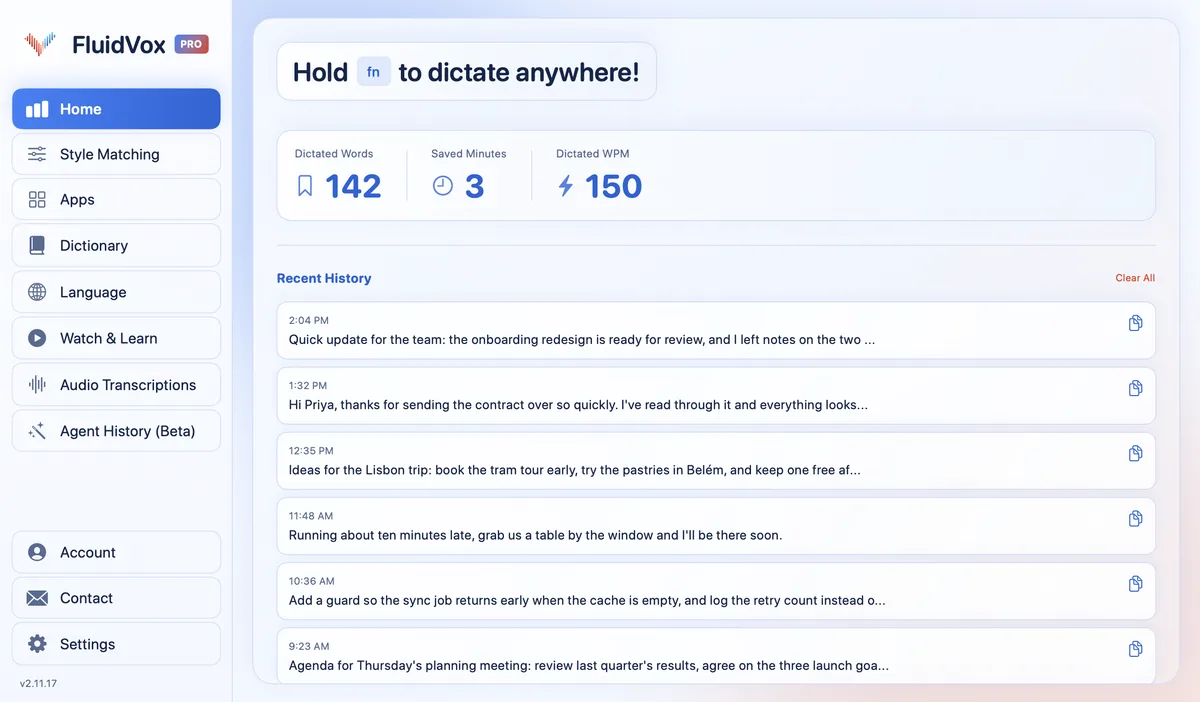
If you dictate with FluidVox, it does the counting for you: the Dictated WPM figure divides the words you dictated today by the time you spent recording them.
Speaking compared with typing
Even a slow speaker outpaces most typists. In Aalto University's study of 168,960 people who took an online typing test, the average was about 52 words per minute. In a laboratory study led by Stanford University researchers, people entered short messages on an iPhone 6 Plus either by typing on its keyboard or by speaking to Baidu's Deep Speech 2 speech recognizer. In English, speech was 2.93 times faster: 153 words per minute against 52.
Speech also needed fewer corrections along the way (5.30% against 11.22%), but left slightly more errors in the final text (1.30% against 0.79%). People copied set phrases in a lab, and the authors call these upper-bound results, so real-world numbers may be lower. Writing also means stopping to think, whichever way you do it. Even so, speech was nearly three times as fast in that study.
Turn your speaking speed into text on a Mac or PC
Your computer can already type what you say, for free.
On a Mac:
- Choose Apple menu > System Settings, then click Keyboard in the sidebar. You may need to scroll down.
- Go to Dictation on the right and turn it on. If a prompt appears, click Enable.
- Click where you want the text, then press the Microphone key if your keyboard has one, use the Dictation keyboard shortcut, or choose Edit > Start Dictation.
- Speak at your normal pace. To stop, press Escape, the Microphone key or the shortcut.
On Windows:
- Click in a text box.
- Press the Windows key + H.
- Wait for the "Listening…" alert, then speak.
- To stop, say "Stop listening" or press the microphone button on the voice typing menu.
On a Mac, Dictation adds commas, periods and question marks for you in supported languages. On Windows, turn on automatic punctuation in the voice typing settings, behind the gear icon. For what to say for punctuation and what to check when nothing types, see how to talk to text on your computer.
Where built-in dictation slows you down
The built-in tools are free and quick to start, but they cost you time in other ways if you dictate a lot:
- Mac Dictation stops after a long pause. It ends when it hears no speech for 30 seconds, so stopping to think means starting again.
- Windows voice typing needs the internet. It uses Microsoft's online speech recognition, so without a connection it won't type.
- Neither keeps a list of your words. A name or term they get wrong, they keep getting wrong, and every fix eats into the time you saved.
- The text reads the same everywhere. A chat message and a client email come out in the same tone, so you edit one of them by hand.
Built-in dictation and FluidVox compared
| Built-in dictation | FluidVox | |
|---|---|---|
| Price | Free, built into macOS and Windows | 14-day free trial, then Pro at $10 a month, or Local at $2.99 a month or $39 once |
| When it stops | Mac: when you press Escape, the Microphone key or the shortcut, or after 30 seconds without speech. Windows: when you say "Stop listening" or press the microphone button | When you let go of the key |
| Internet | Windows voice typing needs it | Not needed on the Local plan, which transcribes on your computer |
| Your own words | No list of custom words | Personal dictionary that also learns your corrections |
| Clean-up | Automatic punctuation; in English, Copilot+ PCs also fix grammar and filler words | On Pro, removes filler words and fixes grammar, spelling and punctuation |
| Your speaking rate | Not shown | Dictated WPM, worked out from what you dictated today |
Dictate at your speaking speed with FluidVox
FluidVox lets you write at the pace you talk, in the apps you already use. It lives in the menu bar on a Mac and in the notification area on Windows, and types wherever your cursor is.
- Download FluidVox and start the 14-day free trial. No credit card is needed.
- On a Mac, allow Microphone, Accessibility and Input Monitoring when setup asks. On Windows, check your dictation hotkey in FluidVox's settings.
- Click where you want the text, hold your dictation key (Fn on a Mac), speak, and let go. Clean text appears at your cursor.
- On Pro, FluidVox removes filler words and fixes grammar, spelling and punctuation, so you edit less afterwards. Add names and terms you use to the Dictionary.
- Under Apps, choose a style for each app, so a chat message and a client email don't sound the same.
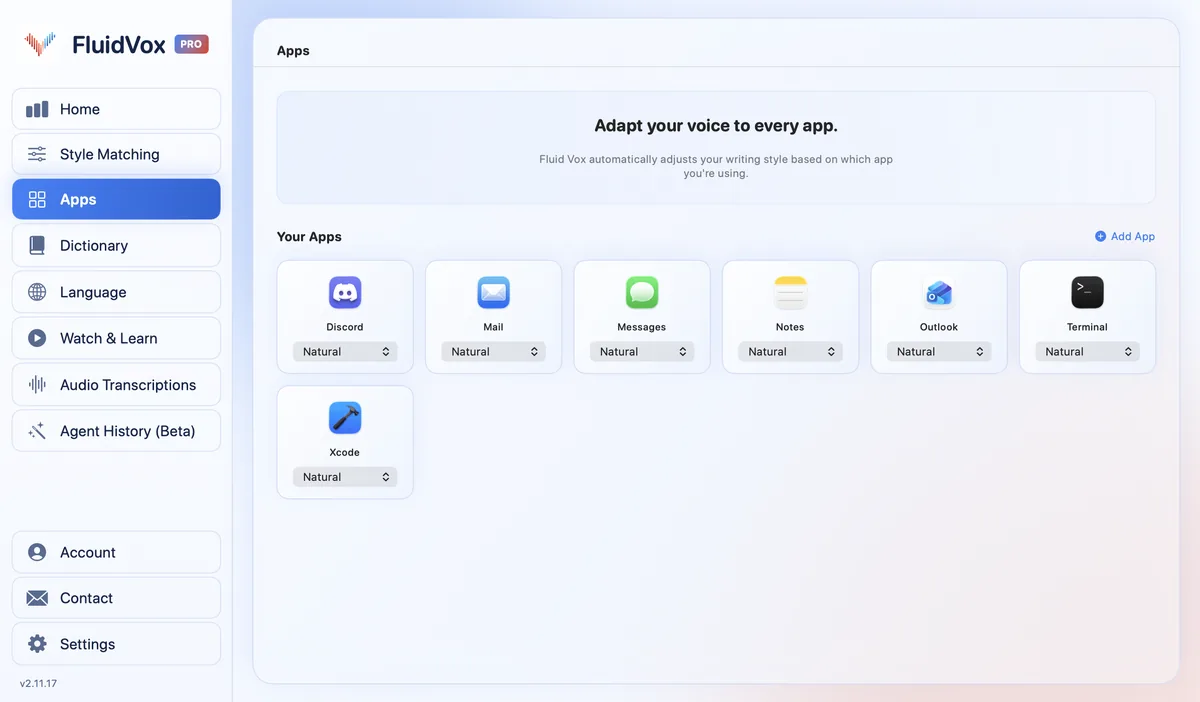
Your Dictated Words, Saved Minutes and Dictated WPM show how much talking instead of typing gives you back. On privacy: cloud transcription sends your audio to a speech service to turn it into text, and with local transcription it runs on your computer instead. Either way, your transcript history stays on your computer.
Which should you use
If you only want to know how fast you talk, or how long your speech will run, you don't need any app: time yourself reading a passage and use the table above. For dictating a sentence or two, the dictation built into your Mac or PC already keeps up with your voice, for free.
If you write long emails, reports or notes, you're already speaking at around 150 words a minute and typing at around 50. Try the built-in dictation first; if it stops when you pause, gets the same names wrong, or gives every app the same tone, try FluidVox for 14 days and watch your Dictated WPM.
FAQ
How many words per minute do people speak?
About 150 to 170 words per minute in conversation. A University of Pennsylvania study of thousands of recorded phone calls found average rates between 152 and nearly 170 words per minute, depending on what people talked about. Reading aloud averages about 183 words per minute across 77 studies.
What is a normal speaking rate?
Most estimates fall between about 140 and 180 words per minute, the rate audiobooks are spoken at, according to a 2019 review of reading rates. ACX, Audible's audiobook marketplace, says most narrators average about 9,300 words an hour, or 155 a minute. Conversation between friends can run faster.
How fast do people talk compared with how fast they type?
About three times faster. The average typist manages about 52 words per minute, according to Aalto University's study of 168,960 people, while people talk at about 150 to 170. In a Stanford-led lab study, speaking short messages into an iPhone ran at 153 words per minute against 52 for typing on its keyboard.
How many words is a 5-minute speech?
About 700 to 900 words, at 140 to 180 words per minute. If you speak slowly or pause for slides and questions, aim for the lower end. A 10-minute talk is about 1,400 to 1,800 words.
How many words per minute do audiobook narrators read?
About 155. ACX, Audible's audiobook marketplace, says most performers narrate about 9,300 words per hour, and a 2019 review of reading research puts audiobooks at 140 to 180 words per minute.
Sources
- Yuan, Liberman and Cieri, Towards an Integrated Understanding of Speaking Rate in Conversation, Interspeech 2006, checked 8 November 2026.
- Brysbaert, How many words do we read per minute? A review and meta-analysis of reading rate, Journal of Memory and Language, 2019, checked 8 November 2026.
- ACX, Narrate an audiobook, checked 8 November 2026.
- Ruan, Wobbrock, Liou, Ng and Landay, Comparing Speech and Keyboard Text Entry for Short Messages in Two Languages on Touchscreen Phones, IMWUT 2017, checked 8 November 2026.
- Aalto University, How do people type on keyboards? (136M Keystrokes), checked 7 November 2026.
- Apple, Dictate messages and documents on Mac, checked 8 November 2026.
- Microsoft, Use voice typing to talk instead of type on your PC, checked 8 November 2026.
Hold one key, speak, and clean text appears in whatever app you're using. Your transcript history stays on your computer.
Download FluidVox 14-day free trial, no credit card.