Blog
Voice to Text Apps for iPhone That Actually Get Punctuation Right
On this page
- The Short Answer: Best iPhone Voice-to-Text Apps by Need
- Why Most iPhone Dictation Botches Punctuation
- FluidVox: On-Device Whisper Transcription With AI Cleanup
- Apple Dictation: The Free Built-In Option
- Dragon Anywhere and Otter.ai: The Professional Tier
- iPhone Voice-to-Text Apps Compared: Price, Punctuation, Offline
- How to Pick the Right One for Your Workflow
The Short Answer: Best iPhone Voice-to-Text Apps by Need
Here are the best voice to text apps for iPhone, matched to what you actually need:
- Best free option — Apple Dictation. Built into the iOS keyboard at no cost, on-device on iPhone 12 and newer, per Apple's dictation guide. Good for quick messages, but you have to speak punctuation commands.
- Best for automatic punctuation and privacy — FluidVox. Auto-adds punctuation, fixes grammar and spelling, and removes filler words using AI cleanup. Runs on-device via Whisper + Parakeet from a $2.99/mo Local plan (or $39 one-time), per FluidVox.
- Best for professional and medical/legal dictation — Dragon. Highest accuracy with custom vocabulary, but the desktop edition runs $699 one-time, and mobile Dragon Anywhere is about $15/mo, per PCMag.
- Best for meeting transcription — Otter.ai. Cloud-based with speaker labels and summaries; a free tier plus Pro plans around $8.33–$16.99/mo.
- Best backup keyboard — Gboard. Free Google keyboard with voice typing baked in.
Price anchors run from free (Apple Dictation, Gboard) to $699 (Dragon Professional desktop), with on-device AI cleanup apps like FluidVox sitting in the affordable middle. If your main frustration is dictation that drops commas and periods, skip straight to an AI-cleanup app.
Why Most iPhone Dictation Botches Punctuation
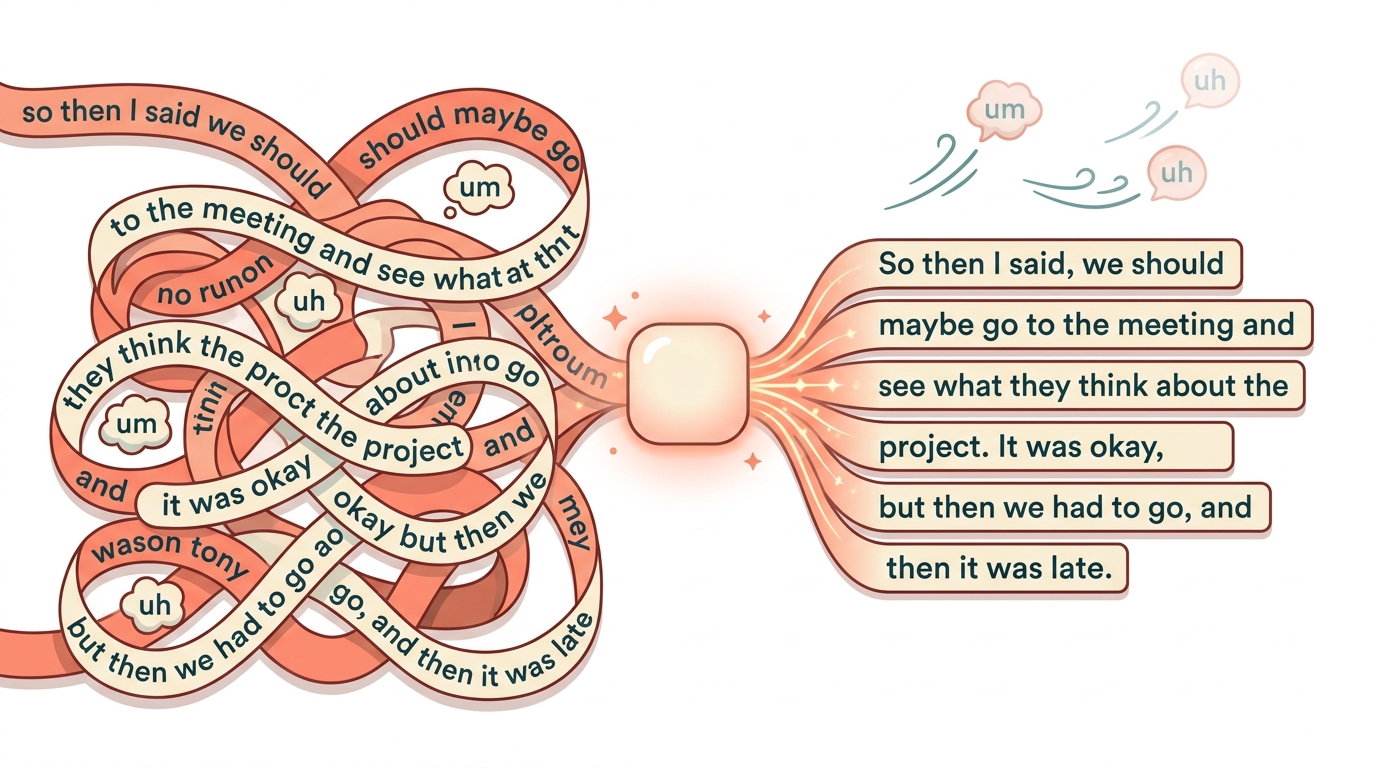
Most iPhone dictation botches punctuation because raw speech-to-text only writes down the words you say—it doesn't infer where sentences end. Apple Dictation, for example, requires you to speak the commands out loud: you literally say "comma," "period," or "new paragraph" for them to appear. Forget to, and you get one long run-on sentence you have to fix by hand.
That's the difference between old-style speech recognition and newer AI-cleanup apps. Traditional dictation maps sound to text and stops there. AI apps run your transcript through a large language model that reads the whole phrase, then adds punctuation, capitalizes properly, fixes obvious spelling and grammar slips, and strips out "um," "uh," and repeated words. You speak naturally; the model formats it like you wrote it.
Auto-punctuation is the single feature that separates a usable dictation app from a frustrating one. When the software decides sentence boundaries for you, dictation stops feeling like programming and starts feeling like talking. Filler word removal matters just as much—natural speech is full of false starts, and a good model quietly deletes them.
If you want the deeper mechanics of how accuracy is measured, FluidVox breaks it down in Voice Typing Accuracy Explained, and the difference between raw dictation and cleaned-up output is covered in Voice Typing vs Dictation. The short version: look for "automatic punctuation" and "grammar correction," not just "speech recognition."
FluidVox: On-Device Whisper Transcription With AI Cleanup
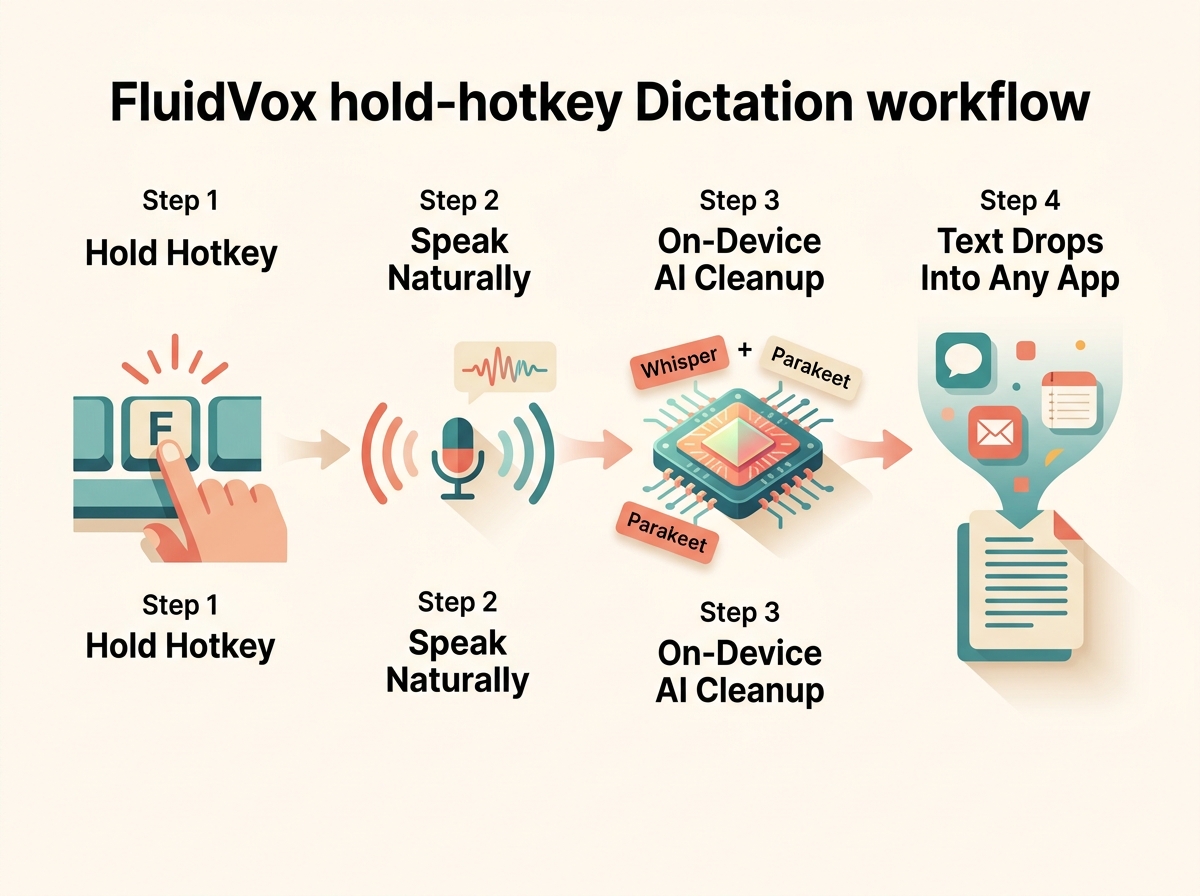
FluidVox is a voice-to-text app for iPhone, macOS, and Windows that auto-corrects grammar, spelling, punctuation, and filler words as you speak—directly solving the run-on-sentence problem built-in dictation leaves you with. Instead of copying and pasting from a separate app, you hold a hotkey, talk, and release; the cleaned-up text drops straight into whatever app is active, per FluidVox.
The hold-hotkey workflow is the core of it. You press and hold a key to talk, let go, and the polished text appears in Messages, Mail, Notes, Slack, or a browser field—no menu diving, no manual formatting pass. FluidVox supports 99 languages and six transcription styles, so the same dictation can come out casual, formal, or bullet-pointed depending on what you're writing.
Privacy-minded users can run everything on-device. The Local plan uses Whisper + Parakeet transcription models that work offline and keep audio on the machine, starting at $2.99/mo or a $39 one-time purchase, per FluidVox. A separate iPhone listing offers a $4.99 one-time bring-your-own-key option for people who already have an OpenAI account. Higher Pro tiers ($10/mo) and Pro+ ($29/mo) add larger AI token allowances and file-transcription minutes.
What pushes FluidVox past plain dictation is Vox Agent, a set of roughly 19 to 30 voice-driven tools covering calendar, email, iMessage, reminders, PDFs, web search, and Apple Shortcuts. You can say "Hey Vox" to translate, rephrase, or summarize on the fly. FluidVox positions itself for people who dictate across many apps—see its use-case library for app-specific setups. Note that the standalone iPhone app is newly released, so treat its self-reported "95%+ on clear speech" accuracy figure as a marketing claim rather than an independent benchmark.
Apple Dictation: The Free Built-In Option
Apple Dictation is free, built into the iOS keyboard, and available on every modern iPhone with no download required. Tap the microphone on the keyboard and start talking—text appears in almost any text field system-wide. On iPhone 12 and newer, processing happens on-device for many languages, which keeps your speech private and works without a connection, per Apple.
For short messages, quick notes, and search queries, Apple Dictation is genuinely good and costs nothing. Speed is solid, and it handles common vocabulary well across more than 30 languages.
The catch is punctuation. Apple Dictation requires you to speak commands out loud—"comma," "period," "question mark," "new line"—or it runs your words together. There's no AI layer rewriting sloppy phrasing, removing filler words, or fixing grammar. For a two-line text that's fine. For a long email or a paragraph of notes, you'll spend real time cleaning up afterward.
Apple Dictation is the right choice when your dictation is short, casual, and you don't mind saying "period" out loud. Once you're dictating multiple paragraphs a day, the manual punctuation gets tedious, and an AI-cleanup app earns its price. If accessibility is your priority, FluidVox's accessibility guide compares the free built-in tools side by side.
Dragon Anywhere and Otter.ai: The Professional Tier
Dragon and Otter.ai sit at the professional end of the market, and they solve different jobs than everyday dictation. Dragon, from Nuance, targets specialized dictation—doctors, lawyers, and anyone who needs custom vocabulary and long-form accuracy. The desktop edition costs $699 one-time (or about $55/mo), while mobile Dragon Anywhere runs roughly $15/mo, per PCMag. Its selling point is 99%+ accuracy with trainable industry terms, though recent iOS support for the flagship product has thinned out.
Otter.ai is a different animal: it's built for meeting transcription, not typing into apps. Otter records or joins calls, produces a transcript with speaker labels, and generates summaries, with integrations for Zoom, Google Meet, and Microsoft Teams. Pricing includes a free tier of about 300 minutes per month, with Pro plans around $8.33–$16.99/mo and Business tiers up to roughly $30/user/mo. Everything runs in the cloud, so it needs internet and isn't meant for offline real-time dictation.
The cost is justified when the job demands it. Pay $699 for Dragon if you dictate medical or legal documents all day and need custom vocabulary that generic apps can't match. Pay for Otter if your work revolves around meetings and you need searchable transcripts with who-said-what. For plain "type what I say into my email," both are overkill—a $2.99–$15/mo dictation app does that job better and cheaper. Executives weighing the tradeoffs can compare options in FluidVox's voice typing for executives guide.
iPhone Voice-to-Text Apps Compared: Price, Punctuation, Offline
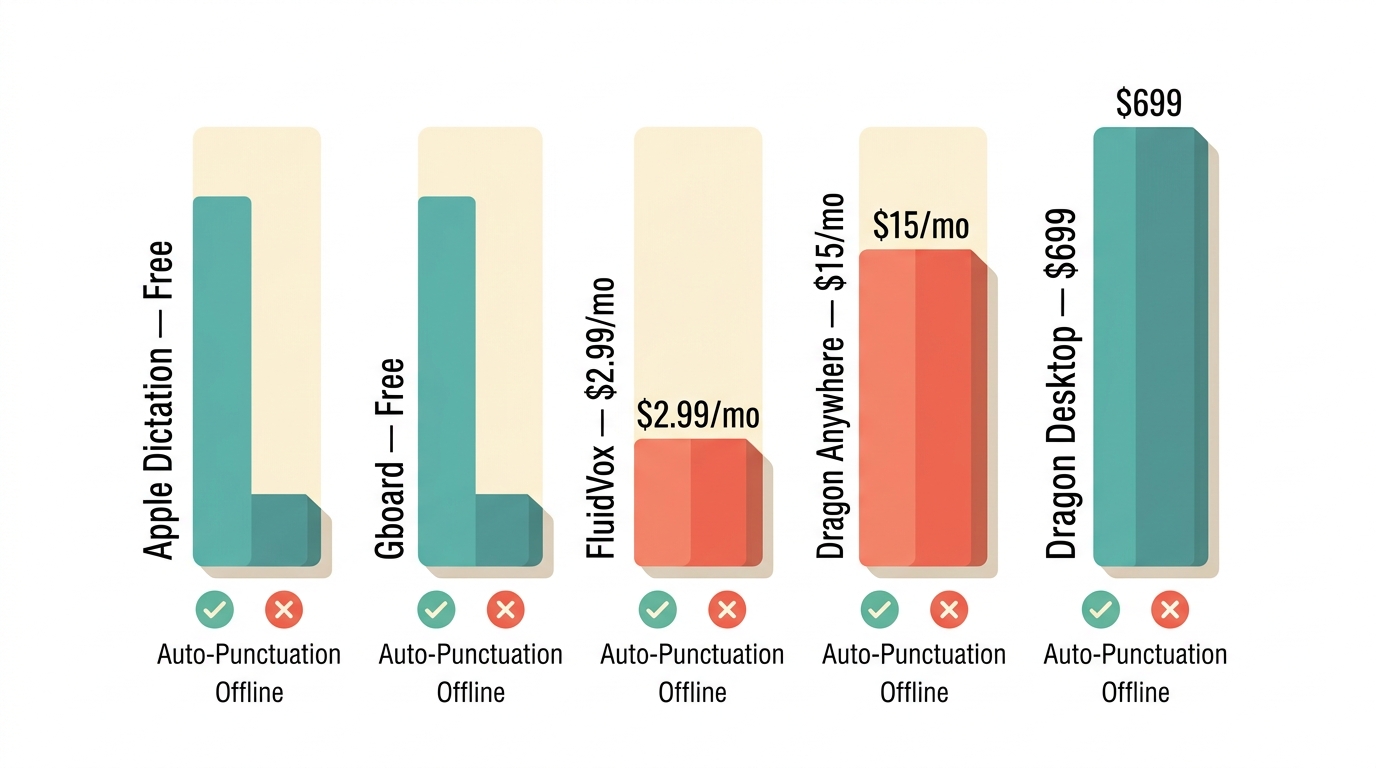
Here's how the main iPhone voice-to-text apps stack up on the three axes that matter most—price, automatic punctuation, and offline support.
| App | Price | Auto-Punctuation | Offline / On-Device | Primary Workflow |
|---|---|---|---|---|
| Apple Dictation | Free | No (spoken commands required) | Yes (iPhone 12+) | Keyboard mic, quick capture |
| Gboard | Free | Partial | Yes | Keyboard voice typing |
| FluidVox | $2.99/mo or $39 one-time (Local); $4.99 one-time BYOK | Yes (AI cleanup) | Yes (Whisper + Parakeet) | Hold-hotkey, types into any app |
| Dragon Anywhere | ~$15/mo mobile; up to $699 desktop | Yes | Limited | Professional / specialized dictation |
| Otter.ai | Free tier; ~$8.33–$16.99/mo Pro | Yes | No (cloud only) | Meeting transcription with speaker labels |
Pricing and plan details are drawn from FluidVox and PCMag's speech-to-text roundup. The takeaway: free tools skip real auto-punctuation, and cloud pro tools skip offline mode—so if you want both, an on-device AI app is the sweet spot.
How to Pick the Right One for Your Workflow
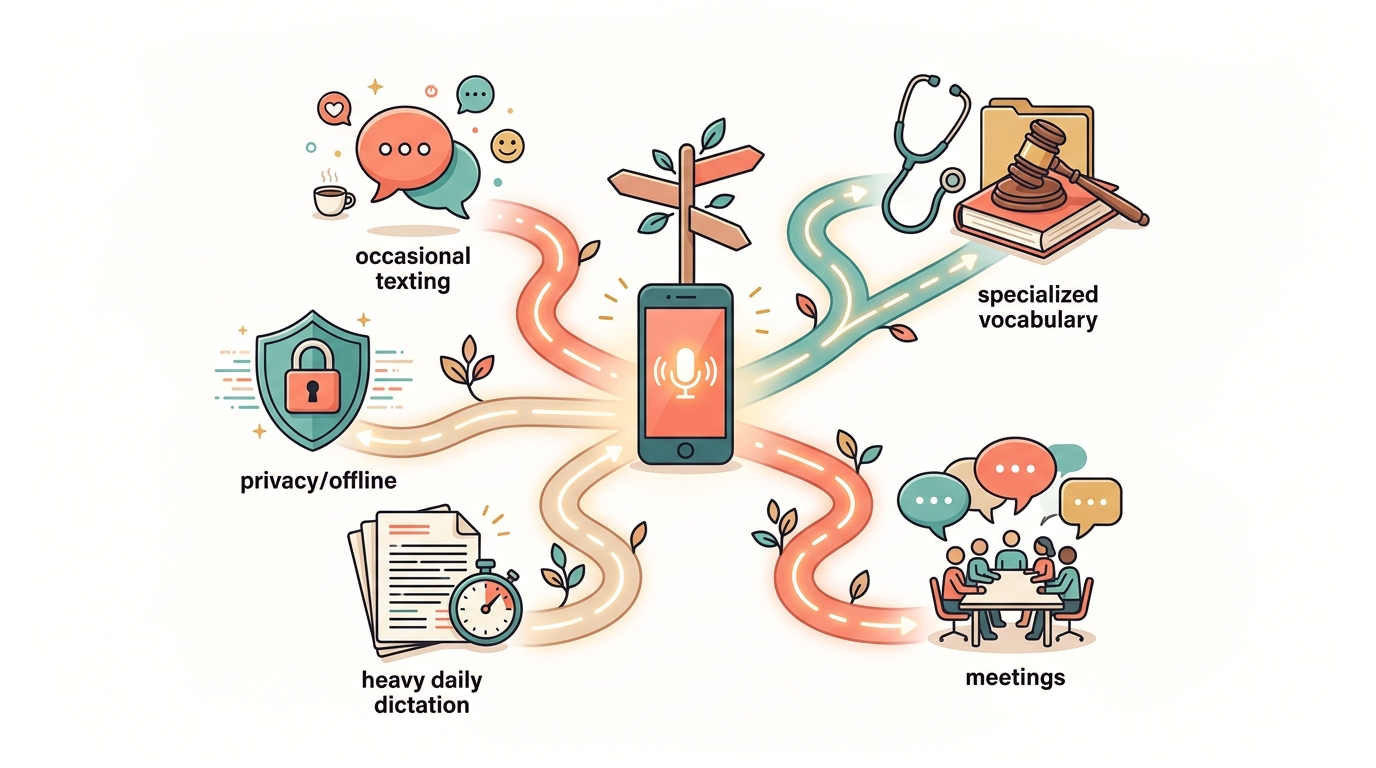
Match the app to how you actually dictate, not to the longest feature list. Use this framework:
- Casual, occasional dictation → Apple Dictation (free). If you dictate short texts and search queries a few times a day and don't mind saying "period" out loud, the built-in tool is all you need. Don't pay for anything.
- Privacy or offline is non-negotiable → an on-device app. If you're dictating sensitive notes or work without reliable internet, choose a tool that processes locally. FluidVox's Local plan ($2.99/mo or $39 one-time) runs Whisper + Parakeet entirely on-device; the case for local models over cloud subscriptions is laid out in this FluidVox breakdown.
- Heavy daily dictation across apps → a hotkey AI-cleanup app. If you write email, chat, and docs by voice all day, a hold-hotkey workflow that auto-punctuates and drops text into any app saves the most time and copy-paste friction.
- Medical, legal, or specialized vocabulary → Dragon. When accuracy on industry terms matters more than price, Dragon's custom vocabulary justifies its cost.
- Meeting-heavy work → Otter.ai. For searchable transcripts with speaker labels and summaries, a dedicated meeting tool beats any dictation app.
Start with the free tool for a week. If manual punctuation and cleanup keep slowing you down, that friction is exactly what a paid AI-cleanup app removes—and for most heavy users, the few dollars a month pays for itself in saved editing time.
Key takeaways
- Automatic punctuation, not raw transcription speed, is the real differentiator between iPhone dictation apps.
- Prices span free (Apple Dictation, Gboard) to $699 (Dragon desktop), with AI-cleanup apps in the middle.
- Apple Dictation requires you to speak 'comma' and 'period' commands out loud.
- FluidVox runs on-device via Whisper + Parakeet from $2.99/mo and auto-fixes grammar and punctuation.
- On-device transcription keeps audio private and works offline; cloud tools like Otter.ai need internet.
Frequently asked questions
What is the best free voice to text app for iPhone?
Apple Dictation is the best free option, built into the iOS keyboard at no cost and running on-device on iPhone 12 and newer. Gboard, Google's free keyboard, is a solid backup. Both are great for short messages but require spoken punctuation commands and lack the AI grammar cleanup that paid apps provide.
Does iPhone voice to text add punctuation automatically?
Apple's built-in dictation does not add punctuation automatically—you must say "comma," "period," or "new paragraph" out loud. AI-cleanup apps like FluidVox do add punctuation for you, using a language model that reads your phrasing, inserts commas and periods, fixes grammar, and removes filler words as you speak.
Can I use voice to text on iPhone offline?
Yes. Apple Dictation processes on-device offline on iPhone 12 and newer for many languages. FluidVox's Local plan ($2.99/mo or $39 one-time) uses on-device Whisper + Parakeet models that work without internet and keep audio on your device. Cloud tools like Otter.ai require an internet connection.
Which iPhone dictation app is most accurate?
For specialized vocabulary, Dragon claims 99%+ accuracy with custom terms, which is why it commands up to $699. For everyday dictation, AI-cleanup apps like FluidVox report 95%+ on clear speech and add automatic punctuation and grammar correction. Note that vendor accuracy figures are self-reported, not independently benchmarked.