Blog
Voice Typing vs. Typing: Why Your Fingers Are Slowing You Down
On this page
- The 3 Voice Typing Stories Worth Knowing This Month
- Why Privacy and Offline Processing Became the Big Fight
- Free OS Engines vs. Paid AI-Cleanup Apps: The Real Split
- What Voice Typing Actually Costs in 2026
- Where FluidVox Fits Among the New Tools
- Should You Switch From Typing to Dictation?
The 3 Voice Typing Stories Worth Knowing This Month
Three recent stories show where voice typing is heading: privacy, AI cleanup, and phones that rewrite reality. Here's the fast recap.
FUTO Voice Input became a real offline replacement for Google's voice typing. In an August 22, 2026 How-To Geek piece, writer Bertel King explained why he swapped Google's dictation for FUTO Voice Input, an Android app that runs entirely on-device and stores no data. His verdict: the quality of the results was "shockingly good," and nothing left his phone. That's a big deal for anyone who dislikes shipping their voice to a server.
The New York Times published a love-hate column about Wispr Flow. On August 19, 2026, a Times Magazine writer "wrote" an entire column using Wispr Flow, the AI dictation app that turns messy speech into polished prose. The headline — which involved a hammer — captured the tension: these tools feel magical and maddening at once. It's a sign that AI-cleanup dictation has gone mainstream enough to earn a big-media takedown.
The Pixel 11 started editorializing your recordings. Android Police reported on August 25, 2026 that Google's Pixel 11 doesn't capture your day as it happened — it captures a flattering edit. Any pretense of being a neutral recorder is gone. The phone is "an editor with opinions," and that raises a real question for voice tools: how much cleanup is help, and how much is fiction?
All three point the same direction — the machine is doing more between your mouth and the screen.
Why Privacy and Offline Processing Became the Big Fight
Privacy became the central battle because most voice typing sends your audio to a company's servers to be transcribed, and people finally started noticing. When you dictate an email in a browser tool or a cloud app, your voice usually travels to Google's or Microsoft's speech engines before text comes back. That's fine for a grocery list. It's less fine for a confidential work message or a doctor's note.
That's why the How-To Geek switch to FUTO Voice Input resonated. FUTO Voice Input works entirely on-device, stores no data, and ships as a standalone Android app. Nothing you say leaves the phone. The trade-off used to be accuracy — offline models were worse — but that gap is closing fast, which is exactly why King called the results shockingly good.
Desktop tools are moving the same way. FluidVox offers a local, offline transcription model that runs on-device using Whisper and Parakeet, so transcripts never leave your machine. Superwhisper on macOS does the same. Even Windows Voice Typing now runs its "Fluid dictation" cleanup on-device on Copilot+ PCs, according to Microsoft's support documentation.
The Pixel 11 story is the cautionary flip side. When a device edits your recordings to flatter you, on-device processing alone doesn't guarantee honesty — it just guarantees the editing happens locally. Privacy and accuracy are now separate promises, and buyers have to weigh both. If you want to understand the trade-offs in plain terms, FluidVox's voice typing accuracy explainer breaks down what word error rate actually measures.
Free OS Engines vs. Paid AI-Cleanup Apps: The Real Split
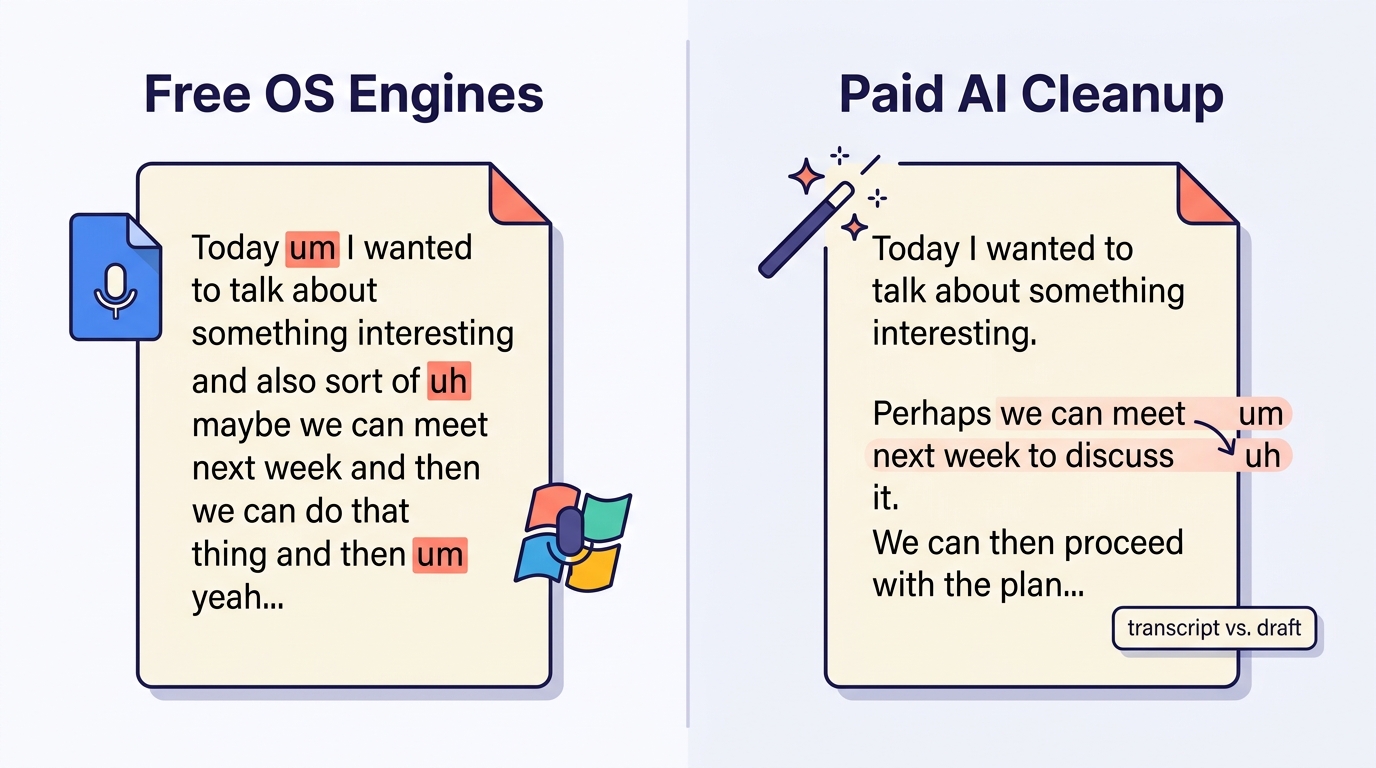
Voice typing tools fall into two camps, and the line between them is AI cleanup. On one side sit the free engines built into your OS or browser: Google Docs Voice Typing, Windows Voice Typing, SpeechTexter, and Speechnotes. These transcribe what you say, roughly, and leave punctuation to voice commands or manual fixes. They advertise accuracy in the 90–95% range — Speechnotes claims 95% for English and SpeechTexter cites above 90% — though those are self-reported figures under ideal conditions, not independent benchmarks.
On the other side are paid AI-cleanup apps like FluidVox and Wispr Flow. These do more than transcribe. They strip filler words, fix grammar and punctuation, and reshape rambling speech into finished text. That's the magic the New York Times columnist both loved and wanted to smash with a hammer — the app decides what you meant, not just what you said.
FluidVox is a clear example of the second camp. It lives in your menu bar, supports 99 languages, and offers six transcription styles — natural, casual, professional, code, notes, and email — so the output matches where you're writing. Hold a hotkey, talk, and the cleaned-up text drops straight into whatever app is open: Gmail, Slack, Google Docs, Apple Notes. No copy-paste. The AI removes "ums" and false starts in real time.
The practical difference: free tools give you a transcript, paid tools give you a draft. If you dictate rough thoughts and hate editing afterward, the cleanup layer is what you're paying for. If you speak carefully and just want words on a screen, the free engines already do that. For a deeper ranked comparison, FluidVox maintains a guide to the best voice typing apps for Mac in 2026.
What Voice Typing Actually Costs in 2026
Voice typing ranges from completely free to a $699 one-time Dragon Professional license, with most AI apps landing in the $3–$15/month range. The table below shows where the major tools sit — and flags a real conflict in FluidVox's own numbers worth knowing before you buy.
| Tool | Price | Languages | Offline / on-device | AI cleanup |
|---|---|---|---|---|
| Windows Voice Typing | Free (built-in) | 46 | On-device on Copilot+ PCs | Yes (Fluid dictation, English) |
| Google Docs Voice Typing | Free | Many | No | No |
| SpeechTexter | Free | 70+ | No | No |
| Speechnotes | Free w/ ads; $1.90/mo premium; $0.10/min transcription | Many | No | No (voice commands only) |
| FluidVox | $2.99–$29/mo, or $39 one-time (Local) | 99 (26 on iOS listing) | Yes (Local plan, Whisper + Parakeet) | Yes (real-time) |
| Wispr Flow | ~$12–15/user/mo; free Basic tier | 100+ | No | Yes |
| Superwhisper | $249 one-time; limited free tier | ~100 | Yes | Yes |
| Dragon Professional | $699 one-time; Anywhere $15/mo | — | Windows | Yes |
One honest caveat: FluidVox's own numbers diverge across its channels. Its website lists the Local plan at $2.99/mo or $39 one-time and claims 99 languages, while its iOS App Store listing shows 26 locales and different in-app prices, and a rival's comparison page frames the entry point as $10/mo with "no free tier." FluidVox's site advertises a 14-day full-access trial with no credit card. When a figure matters to your budget, check the vendor's live pricing page rather than a competitor's summary.
Where FluidVox Fits Among the New Tools
FluidVox is the clearest example of the AI-cleanup camp built for people who write for a living. It's a menu-bar app for macOS, Windows, and iPhone (Android is coming) that types dictated speech directly into whatever app you're using — email, chat, docs, notes — with no copy-paste step. You hold a hotkey, talk, and finished text appears.
The difference from a raw transcriber is the language model doing cleanup in real time. FluidVox strips filler words, fixes spelling and grammar, and adds punctuation as you speak, so what lands on the page reads like something you edited, not something you mumbled. It offers six transcription styles and a personal dictionary that learns from your corrections, which helps with names, jargon, and code.
On privacy, FluidVox gives you a choice most cloud-only apps don't: a local transcription model that runs on-device with Whisper and Parakeet, keeping your audio off any server, plus a cloud option when you want the fastest, most polished results. That flexibility maps directly onto the privacy fight the FUTO and Pixel stories surfaced.
The target user is a knowledge worker, writer, or productivity-focused person who spends the day moving between apps and wants dictation everywhere, not just in one document. If you spend a lot of time in specific tools, FluidVox publishes workflow guides — like voice typing for writers — that show how the app slots into real routines.
Should You Switch From Typing to Dictation?
Switch to dictation if you think faster than you type and dislike the editing grind — that's where voice typing earns its keep. Most people speak far faster than they type, so dictation can genuinely speed up first drafts of email, messages, and notes. The catch is that raw dictation still needs cleanup, which is exactly why the AI-cleanup camp exists.
Go with a free tool if you speak clearly, work mostly in one app, and don't mind adding punctuation by voice or fixing a few words. Google Docs Voice Typing and Windows Voice Typing cost nothing and handle basic dictation well; PCMag argues built-in OS tools are the right pick for average users. There's no reason to pay if that's your whole use case.
Pay for an AI app like FluidVox or Wispr Flow when your speech is messy, you write across many apps, or you hate editing filler words out by hand. The subscription buys you a draft instead of a transcript — as the New York Times columnist found, that cleanup is both the appeal and the thing you occasionally want to hammer.
And if privacy is your line in the sand, weigh the offline models specifically. FUTO Voice Input on Android, Superwhisper on Mac, and FluidVox's Local plan all keep your voice on your device. That's the fastest-moving part of this market, and in 2026 it's finally good enough to trust.
Frequently asked questions
Is voice typing more accurate than typing?
Not inherently. Free voice engines self-report roughly 90–95% accuracy (SpeechTexter above 90%, Speechnotes 95% for English), and AI apps claim higher on clear speech. But these are vendor figures, not independent benchmarks. Typing has near-zero recognition error; dictation's advantage is speed, not raw accuracy, especially in noisy rooms or with accents.
What is the best offline voice typing app for privacy?
For Android, How-To Geek recommends FUTO Voice Input, which runs entirely on-device and stores no data. On macOS, Superwhisper transcribes offline. FluidVox offers a local, offline model on its Local plan using Whisper and Parakeet, so your audio never leaves your computer. Windows Voice Typing runs some cleanup on-device on Copilot+ PCs.
How much does voice typing software cost?
It spans free to $699. Windows Voice Typing, Google Docs Voice Typing, and SpeechTexter cost nothing. AI apps run mid-range: FluidVox lists $2.99–$29/month (or $39 one-time for its Local plan) and Wispr Flow around $12–15/month. Dragon Professional is a $699 one-time license. Superwhisper is $249 one-time.
Does FluidVox work offline?
Yes. FluidVox's Local plan runs transcription entirely on-device using Whisper and Parakeet models, so your audio never leaves your machine — useful for confidential work. It also offers a cloud option for faster, more polished results when privacy isn't the priority. The company lists the Local plan at $2.99/month or $39 one-time on its website.